How to use it
From building to the first program loaded: the commands, the keys, and the menu that replaces most options while the machine runs.
On this page
Building
# Debian or Ubuntu
sudo apt-get install build-essential libsdl2-dev

make            # with SDL2: picture, sound, keyboard (the default)
make SDL2=0     # no display, for automation; only runs with --headless
make tools      # the conversion tools
| Build option | Adds |
|---|---|
DEBUG=1 | debug symbols, no optimisation |
HTTPAPI=1 | the HTTP control API |
CAST=1 | streaming to a Chromecast (needs OpenSSL) |
MIDI=1 | a host MIDI port (ALSA, CoreMIDI, WinMM) |
TUI=1 | the text-mode debugger (ncurses) |
WIN=1 | a Windows build with MinGW-w64 |
On macOS: brew install sdl2 pkg-config, then make. make wasm builds the browser version (see
In the browser).
Starting
./oric1-emu                                   # bare Oric-1, ROM roms/basic10.rom
./oric1-emu -m atmos                          # Atmos, ROM roms/basic11b.rom
./oric1-emu -r roms/basic11b.rom -t game.tap -f            # a tape, loaded at once
./oric1-emu -r roms/basic10.rom -t game.tap --tape-signal  # a tape at signal level
./oric1-emu -r roms/basic10.rom --disk-rom roms/microdis.rom -d SEDORIC.DSK   # Sedoric
Without -r, Phosphoric starts a bare Oric-1 on roms/basic10.rom, looked for in the current folder
then next to the executable, with no expansion card. --no-rom leaves the $C000-$FFFF area empty.
The main options
| Theme | Options |
|---|---|
| Machine | -r ROM, -m oric1 or atmos, --no-rom |
| Tape | -t FILE, -f (injection), --tape-signal |
| Floppies | --disk-rom ROM, -d then --disk1 to --disk3, --disk-writeback, --fdc-timing real or fast, --bad-sector |
| Save states | --save-state, --load-state |
| Joystick, printer | -j keys or gamepad, -p FILE, --printer-type mcp40 |
| Keyboard | --keyboard azerty, --type-keys CYCLES:TEXT, --type-keys-when ADDR:VAL:TEXT |
| Display | --scale 1 to 4, --headless, --cycles N |
| Screenshots | --screenshot, --screenshot-at, --screenshot-when, --screenshot-text, --video |
| Sound | --audio-wav FILE, --psg-trace FILE |
| Cards | --loci, --serial, --dtl2000, --mageco, --oricon, --jasmin-rom, --sp0256-rom, --mea8000, --hostfs |
| Debugging | -D, --break ADDR, --symbols, --tui, --gdb, --control, --http-api |
./oric1-emu --help gives the full list, with each card’s help.
Automatic typing
--type-keys types text into the Oric, with escape sequences:
| Sequence | Key |
|---|---|
\n | Return |
\e | Escape |
\u, \d, \l, \r | arrows |
\Cx, \Fx | Ctrl + x, Funct + x |
\Lx, \Rx | left or right Shift + x |
\pN | a pause of N emulated seconds |
Typing follows the ROM’s real keyboard scan: no key is lost. With -f on a BASIC program, the
automatic RUN is only cancelled if your own keys fall inside its window.
The keys
| Key | Function |
|---|---|
| F1 | the peripherals menu |
| F2, F4 | quick save and quick load of the state |
| F3 | change the enlargement (×1 to ×4) |
| F5 | reset |
| Shift + F5 | NMI: the button under the Oric (warm restart through the ROM) |
| F6 | swap tape or floppy while running |
| F7 | dump the 64 KB of RAM to a dated file |
| F8 | the LOCI’s Action button: short, menu; long (2 s), diagnostic ROM |
| Ctrl + Alt + M, Ctrl + Alt + D | the same button, short or long, when F8 is taken by the desktop |
| F9 | enter the debugger |
| F10 | quit |
| F11 | full screen |
| F12 | PNG screenshot |
The F1 menu
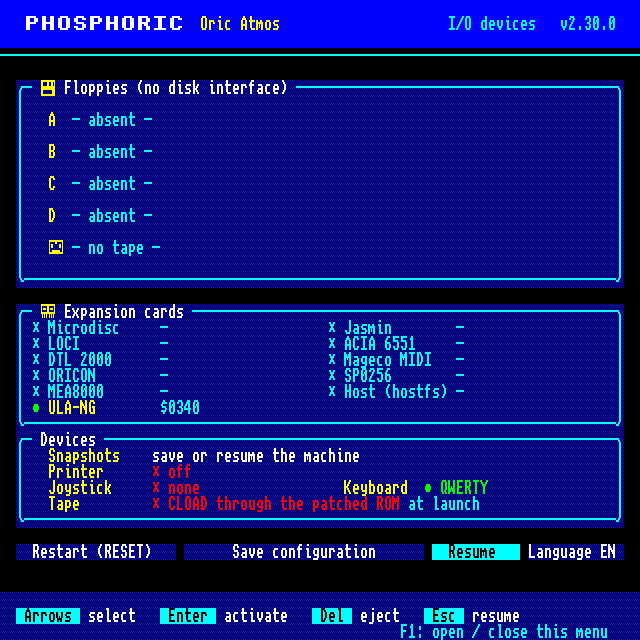
--menu-screenshot.While the menu is open, the machine is frozen and the sound muted; it resumes exactly where it was. The menu sets:
- floppies A to D: insert (a file selector), eject (Del), write-protect (→ then Enter). The floppy goes to the disk card present: Microdisc, Jasmin or LOCI; with no disk card, nothing is mounted;
- the tape: insert, eject, rewind;
- snapshots: save or resume a state (
snapshots/etatNNNN.ost); - the printer (off, text, plotter), the joystick (none, arrows, gamepad), the keyboard (QWERTY or AZERTY), and the tape mode at launch;
- expansion cards: each card has its page, which explains what it does and each of its settings. “Apply and restart” relaunches the emulator with those cards.
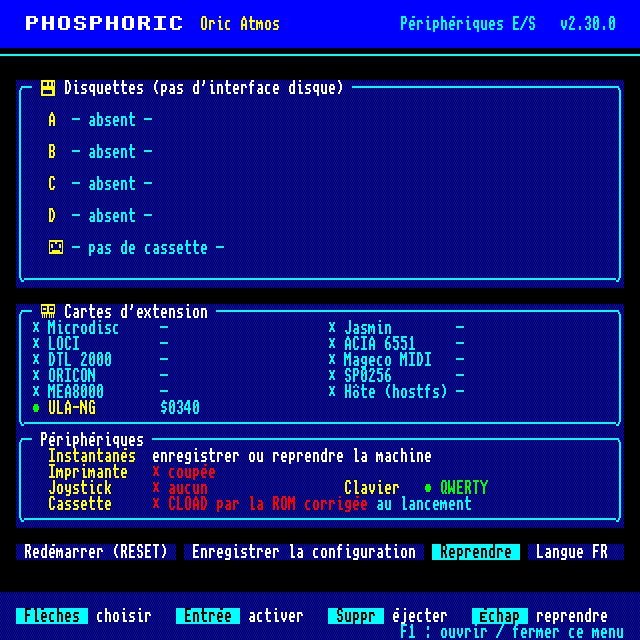
The fourth button switches the language of the whole menu between French and English.
| Key in the menu | Effect |
|---|---|
| ↑ ↓ | change line |
| ← → | move between columns or buttons |
| Enter | activate |
| Del | eject, or reset a setting to its default |
| Escape or F1 | resume the machine |
| a letter | in the selector, jump to the next file starting with it |
The phosphoric.cfg file
“Save configuration” writes phosphoric.cfg, one key=value line per setting: drives (a= to
d=), protections, tape, printer, joystick, keyboard, language, and the cards (carte.<id>=oui or
non, then their settings). It is read at the next launch; the command line always wins. With no
display, it is only read if given (--config FILE). --no-config or PHOSPHORIC_NO_CONFIG=1 ignore
it, which the test suite does.