The emulated Oric
Before seeing how Phosphoric emulates the Oric, let us see what it emulates: four main chips on a bus, 64 KB of addresses, and a very particular way of putting colour on the screen.
On this page
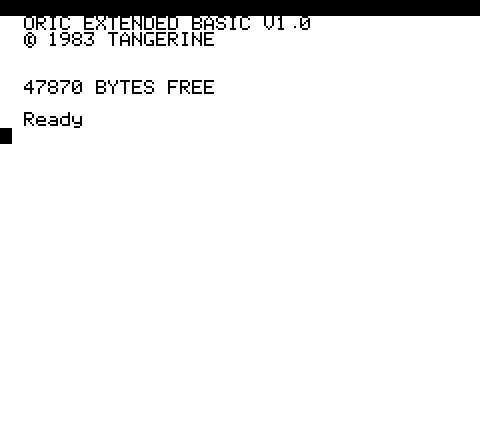
Two models, one board
Phosphoric emulates both Tangerine machines:
| Oric-1 (1983) | Oric Atmos (1984) | |
|---|---|---|
| ROM | BASIC 1.0 (basic10.rom) | BASIC 1.1 (basic11b.rom) |
| RESET vector | $EA59 | $ECCC |
| At start-up | 47870 BYTES FREE | 37631 BYTES FREE |
| Choice | detected from the ROM, or -m oric1 / -m atmos |
Both ROMs are 16 KB. Phosphoric recognises the version from the loaded ROM and adapts its ROM patches (fast tape loading, notably) to each one.
The chips
- The processor, an NMOS 6502 at 1 MHz. It makes one bus access per cycle. Its NMOS version has quirks that Phosphoric reproduces: dummy accesses (reads or writes with no apparent purpose, in the middle of some instructions), 105 “illegal” opcodes on top of the 151 official ones, and a decimal mode.
- The ULA (HCS 10017) makes the picture. It shares memory with the processor: within each microsecond, the 6502 accesses first, then the ULA reads a screen byte. So there is never a conflict, nor a stolen cycle.
- The VIA 6522 has two 8-bit ports and two timers. It selects the keyboard column, receives the tape signal, drives the printer, and raises the system’s interrupts.
- The AY-3-8912 PSG makes the sound: three square-wave voices, a noise generator, sixteen envelope shapes. Its port A also serves the keyboard and the IJK joystick.
The memory
A few addresses come up again and again:
| Address | Contents |
|---|---|
$0300-$03FF | page 3: input and output. The VIA at $0300, expansion cards above it. |
$A000-$BF3F | the HIRES screen: 200 lines of 40 bytes. |
$B400 and $B800 | the text mode character sets (standard and alternate). |
$BB80-$BFDF | the text screen: 28 rows of 40 characters. |
$C000-$FFFF | the BASIC ROM, or, with the Microdisc, RAM and the controller’s ROM at $E000. |
In HIRES mode, the character sets move to $9800 and $9C00, since the graphics screen takes their
place.
Colour through serial attributes
The ULA has no colour memory. Colour is set in the screen itself: a byte whose bits 5 and 6 are zero is not a character but an attribute, which changes the state of the rest of the line:
| Value | Effect |
|---|---|
| 0 to 7 | ink colour (INK) |
| 8 to 15 | text style: alternate set, double height, blinking |
| 16 to 23 | background colour (PAPER) |
| 24 to 31 | video mode: text or HIRES, 50 or 60 Hz |
An attribute takes its place on screen: it shows as a cell in the background colour. Bit 7 of a byte inverts its cell. Each line starts again in white ink on black paper, then the ROM puts its own attributes at the start of the line. That is why the Atmos start-up screen is black on white.
The keyboard
The keyboard is a matrix of 8 columns by 8 rows. The VIA chooses a column (bits 0 to 2 of its port B, through a 74LS138 decoder), the PSG chooses the rows to test (its register 14), and bit 3 of the VIA’s port B tells whether a key is down. The ROM scans the whole keyboard this way, column by column.
Phosphoric reproduces this matrix, offers QWERTY and AZERTY layouts, and synchronises its automatic
typing (--type-keys) with this scan: no key is lost, even when a program reads the keyboard slowly.
The picture, in numbers
| Measure | Value |
|---|---|
| Text | 40 columns × 28 rows, 6 × 8 pixel characters |
| HIRES | 240 × 200 pixels, then 3 rows of text |
| Colours | 8 (black, red, green, yellow, blue, magenta, cyan, white) |
| Line | 64 cycles, 40 of them visible cells |
| Frame | 312 PAL lines, 224 visible, 50 per second |
The details of the scan are in The picture and the ULA.